
Versatile Input Methods
Supports 5 input types: touch, device motion, sound detection, gaze, and external switches — choose the method that best suits the user.
Touch & Beep Connect is an iPad/iPhone app designed for users with physical disabilities.
It responds to a wide range of inputs — screen touch, device motion, voice, eye movement, and external switches — by playing recorded audio or sound effects.
With the Connect features, it can also control BLE devices such as toys and appliances at the tap of a switch.
Versatile Input Methods
Supports 5 input types: touch, device motion, sound detection, gaze, and external switches — choose the method that best suits the user.
Rich Feedback Options
Choose from recorded audio, built-in sound effects, or a timer. Adjust pitch, volume, and add special effects.
BLE Device Control
Connect to MaBeee, MESH, Arm Wonder AIR, and other BLE devices to expand switch-based control.
Free Lite Version
A free Lite version is available for trying out the input methods before purchasing.
See How to Get the App for download links.
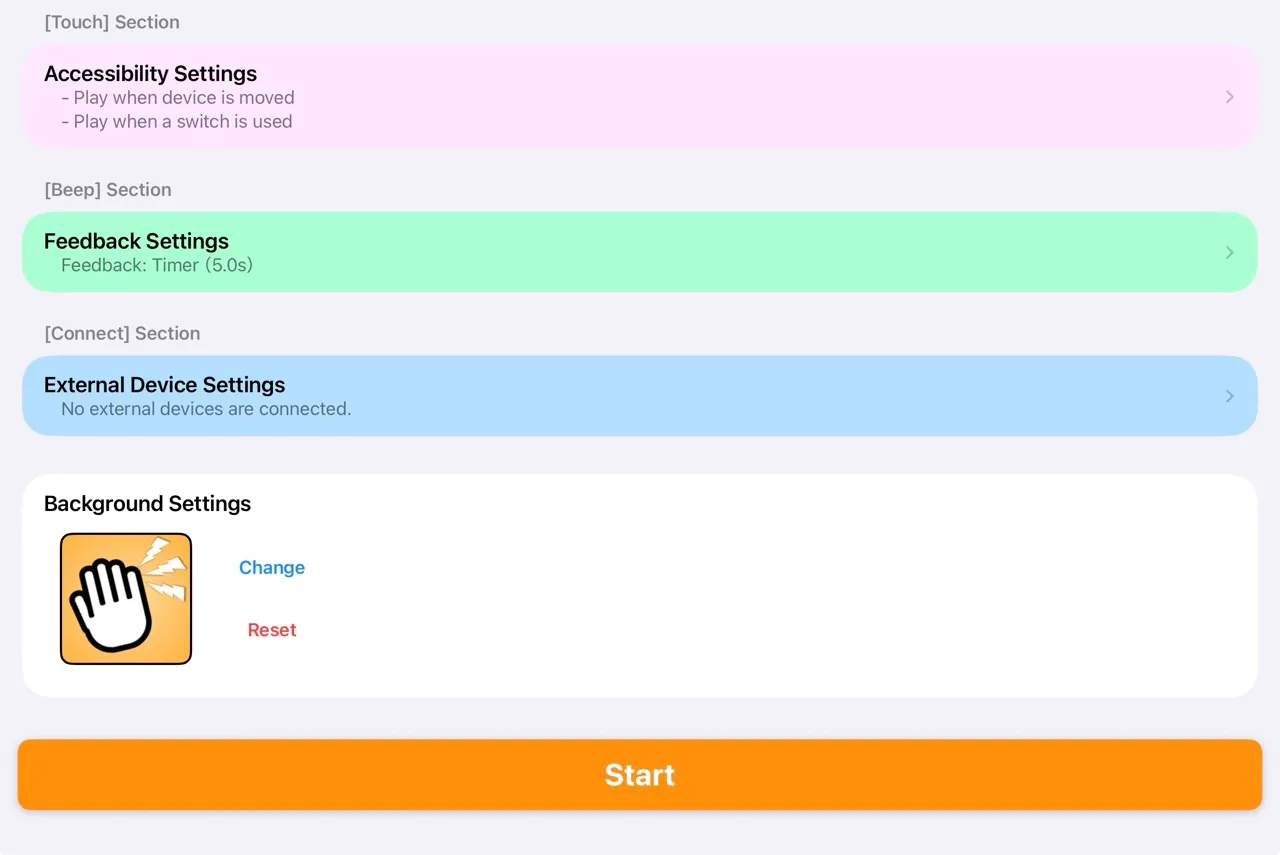
When you launch the app, the home screen shows four settings sections. Tap [Start] when ready to go to the play screen.
| Section | Description |
|---|---|
| Accessibility Settings | Configure which inputs trigger feedback |
| Feedback Settings | Configure what plays when triggered |
| External Device Settings | Configure BLE device connections |
| Background Settings | Set a background image for the play screen |
Choose a photo from your iPhone/iPad photo library to use as the background of the play screen.