
Gaze Operation
Gaze Operation triggers when the user directs their gaze toward a specific direction.
The front-facing camera is used to detect head orientation as a proxy for eye direction.
Play when eyes are moved
Section titled “Play when eyes are moved”| Setting | Description |
|---|---|
| On/Off | Enable or disable gaze detection |
| Play reset sound | Plays a sound when the gaze returns to the baseline position |
Sensitivity Adjustment Screen
Section titled “Sensitivity Adjustment Screen”When Gaze Operation is enabled and you enter the play screen, the sensitivity screen opens automatically.
It can also be opened via the [Adjustment] button on the play screen.
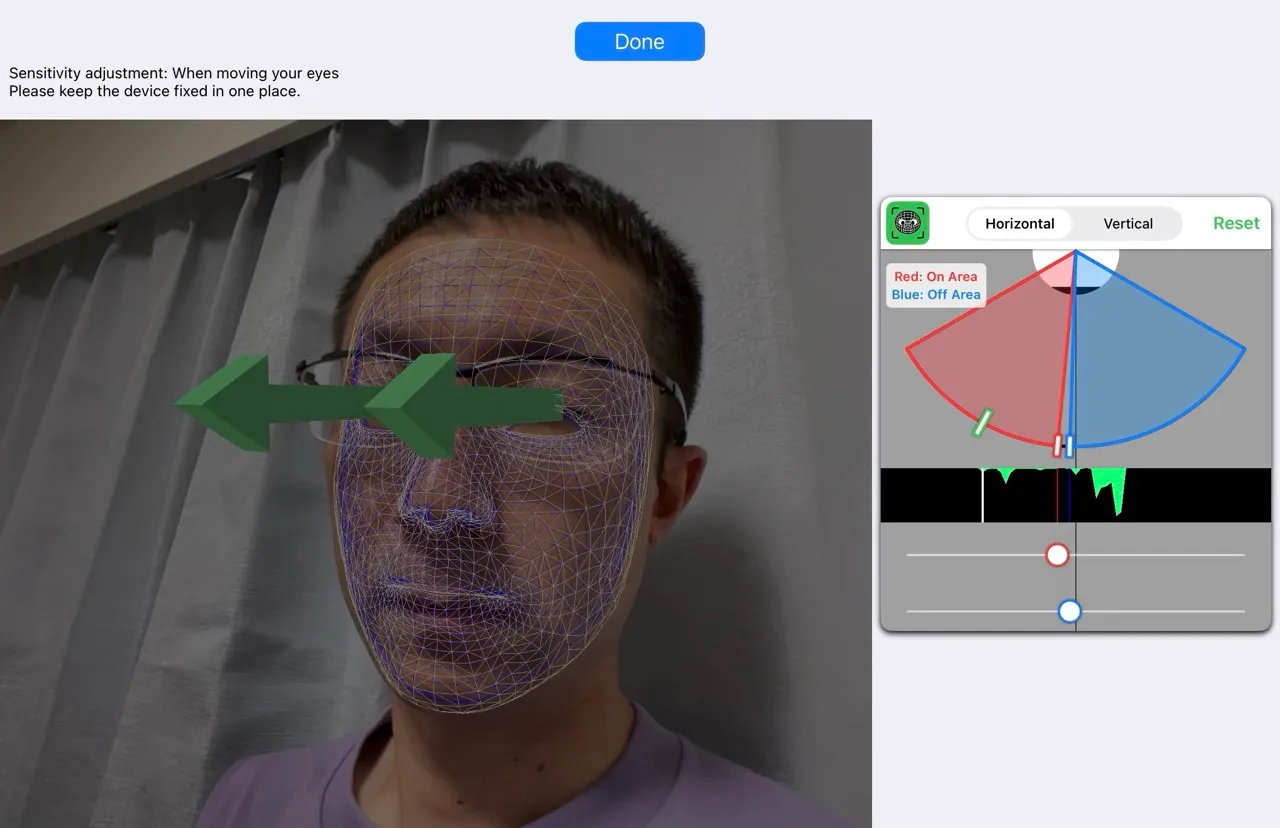

How to Adjust
Section titled “How to Adjust”-
Secure the device: Keep the device as still as possible.
-
Get your face recognised: Once detected, a blue line and a white line appear over your face.
- Blue line: baseline position
- White line: current face position
-
Reset if there is too much drift: If the white line drifts far from the blue line, press [Reset].
-
Set the range with sliders:
- Red slider: On area — the range that triggers input when you move your gaze
- Blue slider: Off area — the range that signals the gaze has returned
-
Use the green gauge as a reference: The green gauge shows where your gaze tends to land. Adjust so that moving your eyes enters the red On area, and returning enters the blue Off area.